Automation & Delivery

Automated Intelligence Newsletters

Automate recurring briefings across any domain with connected sources, custom templates, and your own LLM prompts. Daily Brew’s AutoPilot handles scheduling so your team ships consistent, high-quality intelligence without manual assembly every cycle.

Recurring briefings fail when they depend on one person’s process, manual copy-paste, and tribal knowledge about which sources matter. Daily Brew replaces that with a repeatable pipeline: connect your sources, define your template and prompt once, then let AutoPilot generate and deliver each edition on your schedule—consistently, across any domain you cover.

Studio & Template Builder

Compose, customize, and standardize

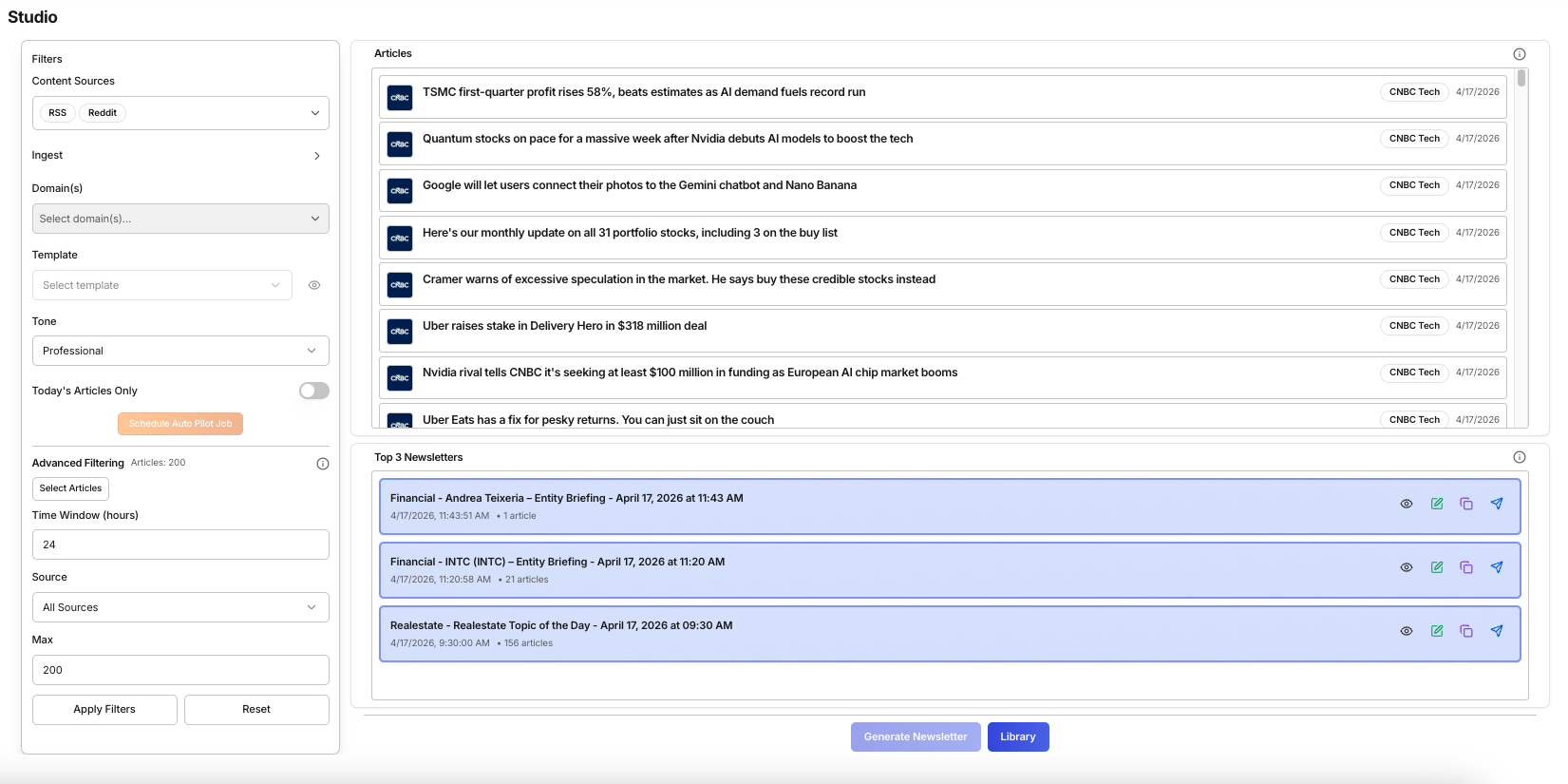
Studio is where each edition is composed: pull fresh content on demand or from a time window, tune source and domain filters, choose a template and tone, then generate a newsletter or brief from the article pool that should define that issue.

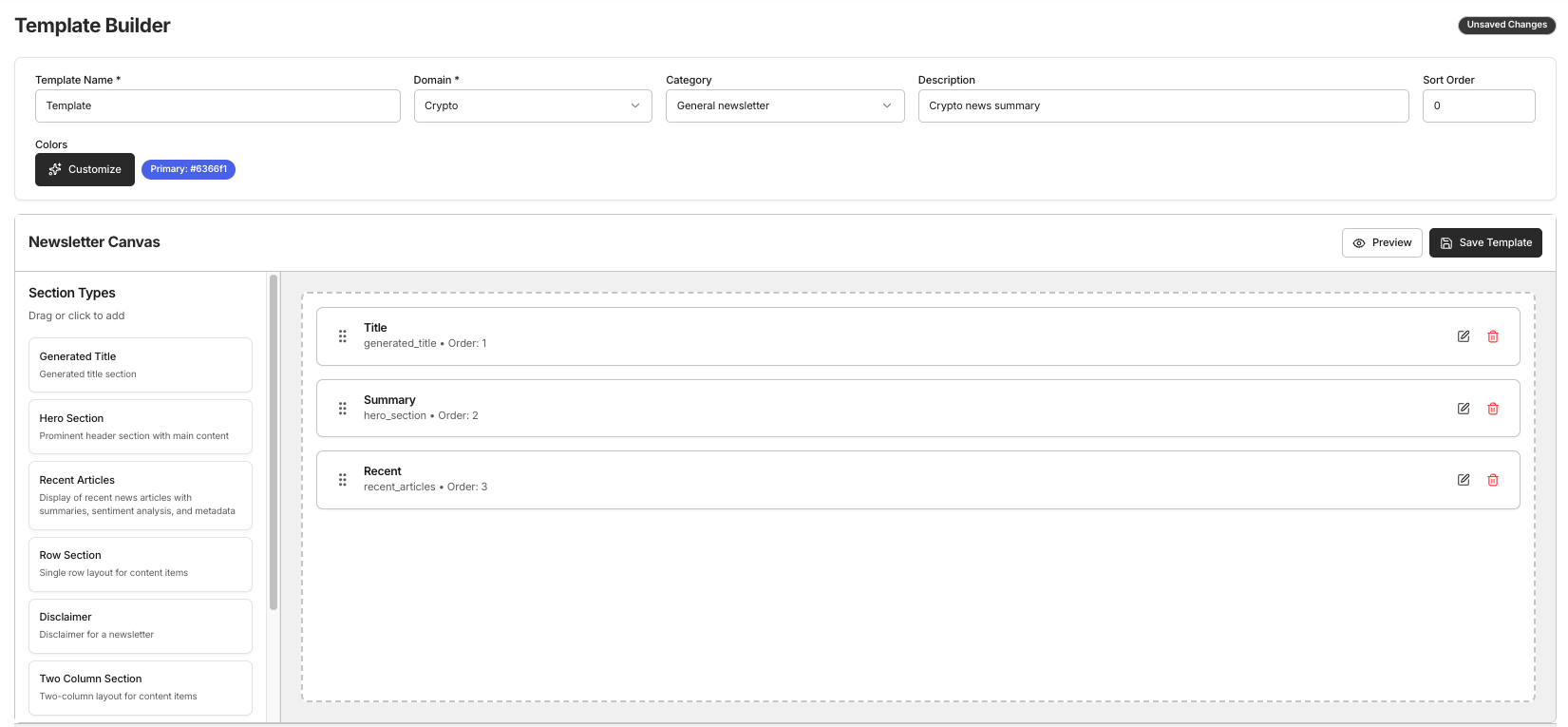
Template Builder is where reusable layout, sections, and LLM prompt rules are defined so every run in Studio and AutoPilot inherits the same structure and brand guardrails instead of improvising format each cycle.

Daily Brew Studio – on-demand newsletter composition view with source selection, time window filters, template picker, and generate controls

Studio — compose each edition on demand with source filters, template selection, and tone controls

Daily Brew Template Builder – reusable newsletter template editor with section layout, custom LLM prompt authoring, and formatting controls

Template Builder — define section layout, custom LLM prompts, and brand guardrails once; reuse across every run

Domain Coverage

Works across 15+ domains—or keep it general

Daily Brew is domain-agnostic. Configure it for a focused vertical by curating the right sources and writing a domain-specific prompt, or leave it general and let your source selection define the coverage. The same platform serves a cybersecurity analyst and a real estate investment team without any platform-level changes.

Finance & Markets Cybersecurity Real Estate Startups & VC Healthcare Legal & Compliance Energy Supply Chain Geopolitics Technology Insurance Retail & Consumer Sustainability Government & Policy Media & Entertainment General (no domain)

Customization

Your template. Your prompt. Your voice.

Most newsletter automation tools lock you into a fixed format. Daily Brew gives you control at every layer—from the sources that feed the pipeline, to the sections in your template, to the exact LLM prompt that shapes the output.

⚙️
Custom LLM Prompts
Write your own generation prompt per template. Control tone (formal, editorial, executive), depth, what to emphasize, how to handle conflicting sources, and what to omit.
🔤
Flexible Template Sections
Design the section layout that matches your audience—headlines, analysis, data tables, executive summary, key takeaways, or any structure your readers expect.
🔌
Connected Source Control
Mix RSS feeds, Reddit communities, websites, and uploaded documents per template. Different newsletters can draw from different source pools without overlap.

Problem

What teams are up against

Recurring briefings often depend on one person’s manual process—copying articles, reformatting content, and remembering which sources to check. When that person is unavailable, the briefing breaks. When they move on, the tribal knowledge goes with them. The result is inconsistent output, missed cycles, and no path to scale.

How Daily Brew helps

A workflow built around usable intelligence

Daily Brew replaces the manual process with a documented pipeline: sources, template, and schedule are configured once and run automatically. Every edition reflects the same structure and source discipline regardless of who pressed the button—or whether anyone did.

Why this use case stands out

A repeatable operating rhythm for teams that need polished, recurring intelligence updates without manual assembly every cycle.

Connected sources
One intake workflow
Scheduled runs
Automation built in
Reusable templates
Consistent output

AutoPilot

Set it once. Ship every cycle.

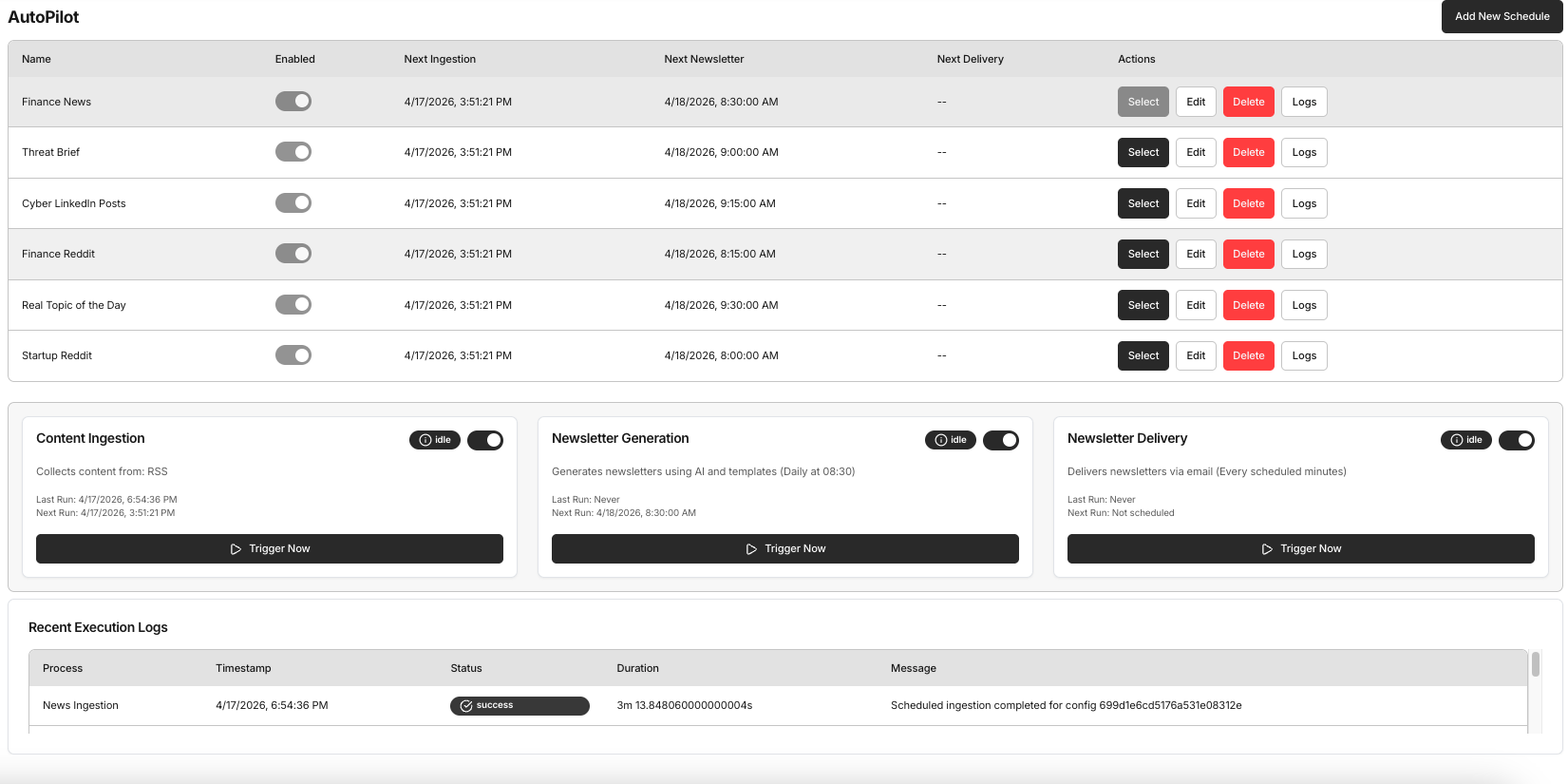
AutoPilot turns your Studio workflow into a scheduled pipeline. Configure ingestion frequency, generation timing, and optional delivery—then step back. Status, last run, and next run visibility give your team a single place to trust cadence, catch failures, and keep recipients on schedule.

Daily Brew AutoPilot – scheduled newsletter pipeline showing ingestion, generation, and delivery status with last run and next run visibility

AutoPilot — scheduled ingestion, generation, and delivery pipelines with status and run history
Capabilities

What teams can do in this workflow

Connected RSS, social, web, and document sources
Custom templates with section layout and LLM prompt control
Scheduled ingestion and AutoPilot-style generation
Preview and library workflows for generated output
Faster onboarding into recurring publishing processes

Workflow

How this plays out in practice

1

Step 1

Connect feeds, social sources, websites, and documents in Feed Hub

2

Step 2

Design your template: section layout, formatting rules, and custom LLM prompt

3

Step 3

Compose and preview your first edition in Studio to validate the output

4

Step 4

Graduate to AutoPilot: schedule ingestion, generation, and delivery to run automatically

Business impact

What teams get from this workflow

Scale recurring output without scaling manual effort
Keep structure and tone consistent across every edition
Build a repeatable operating rhythm independent of any one person

Next step

Show this use case in a live flow

Book a demo to walk through Studio, Template Builder, and AutoPilot on a domain and source set relevant to your team. We’ll show how the template and prompt layer controls the output before handing off to a scheduled pipeline.

See how automated briefing works →

Ready to automate your recurring briefings?

Book a 30-minute demo to walk through source connection, template design, custom prompt authoring, and AutoPilot scheduling on a domain and cadence that matches your team’s workflow.

Schedule a demo → View pricing