A standards-based REST API that puts Daily Brew sentiment data directly inside your apps, dashboards, and data pipelines. Key-authenticated endpoints for daily snapshots and historical ranges — plus MCP servers and agent tools coming soon for fully agentic workflows.
Sentiment is only valuable when it runs where your team already works. Exporting from a product UI doesn’t scale for apps, BI tools, warehouses, or customer-facing features. Daily Brew serves authenticated sentiment as structured JSON so your services, scheduled jobs, and dashboards can consume the same feed-grouped signal programmatically — with a consistent contract that holds across daily and historical endpoints.
API Documentation
Daily sentiment arrives as a feed-grouped payload with scores, short narrative explanations, and key point extracts you can parse directly in application code, BI connectors, or ETL pipelines — no re-deriving the narrative on your end.
Historical retrieval uses the same response shape over a date range, so loading a backfill into a warehouse uses the same parsing logic as your real-time integration. One contract, two access patterns.
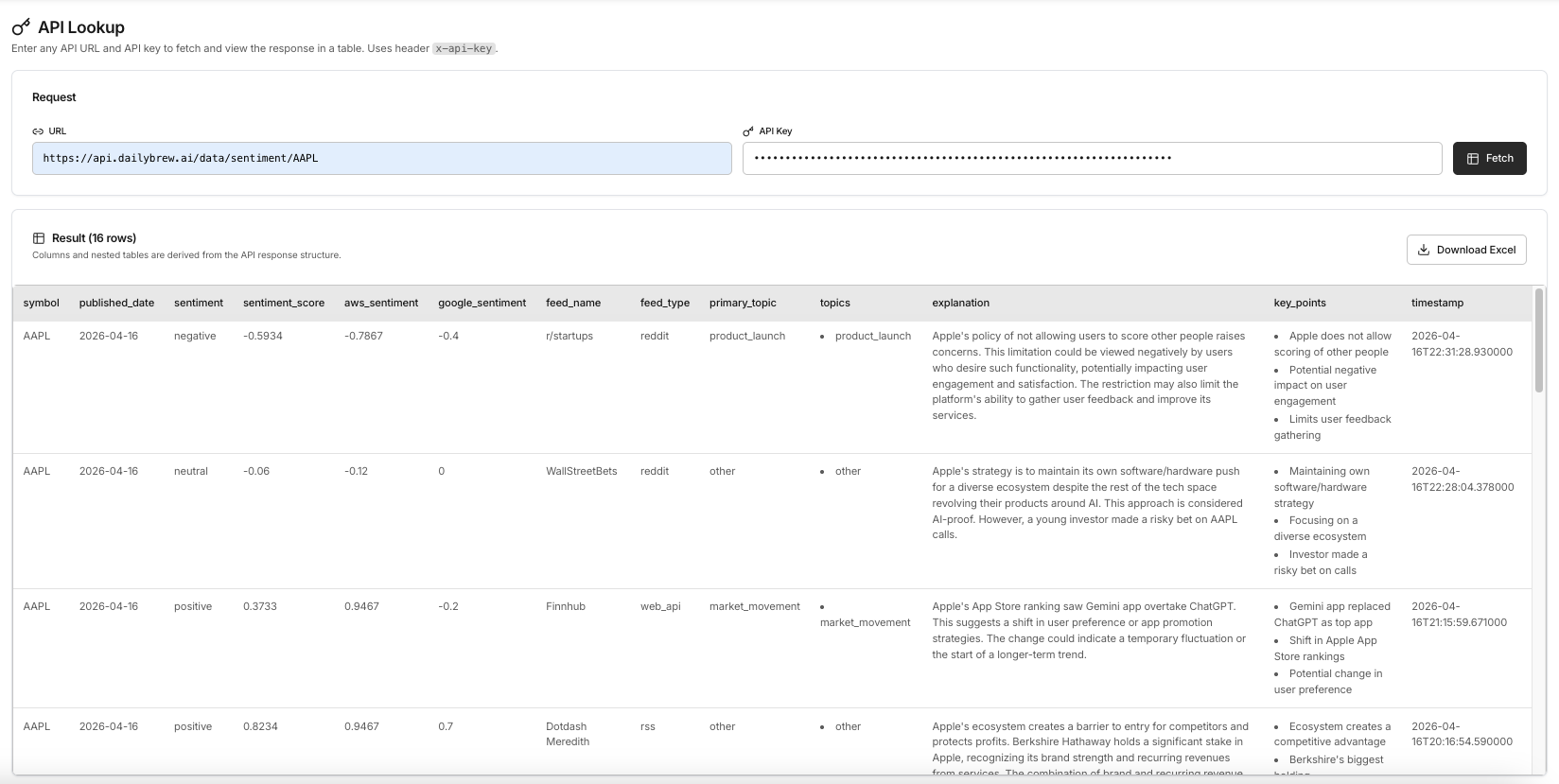
Daily endpoint — feed-grouped sentiment scores, explanations, and key points by symbol
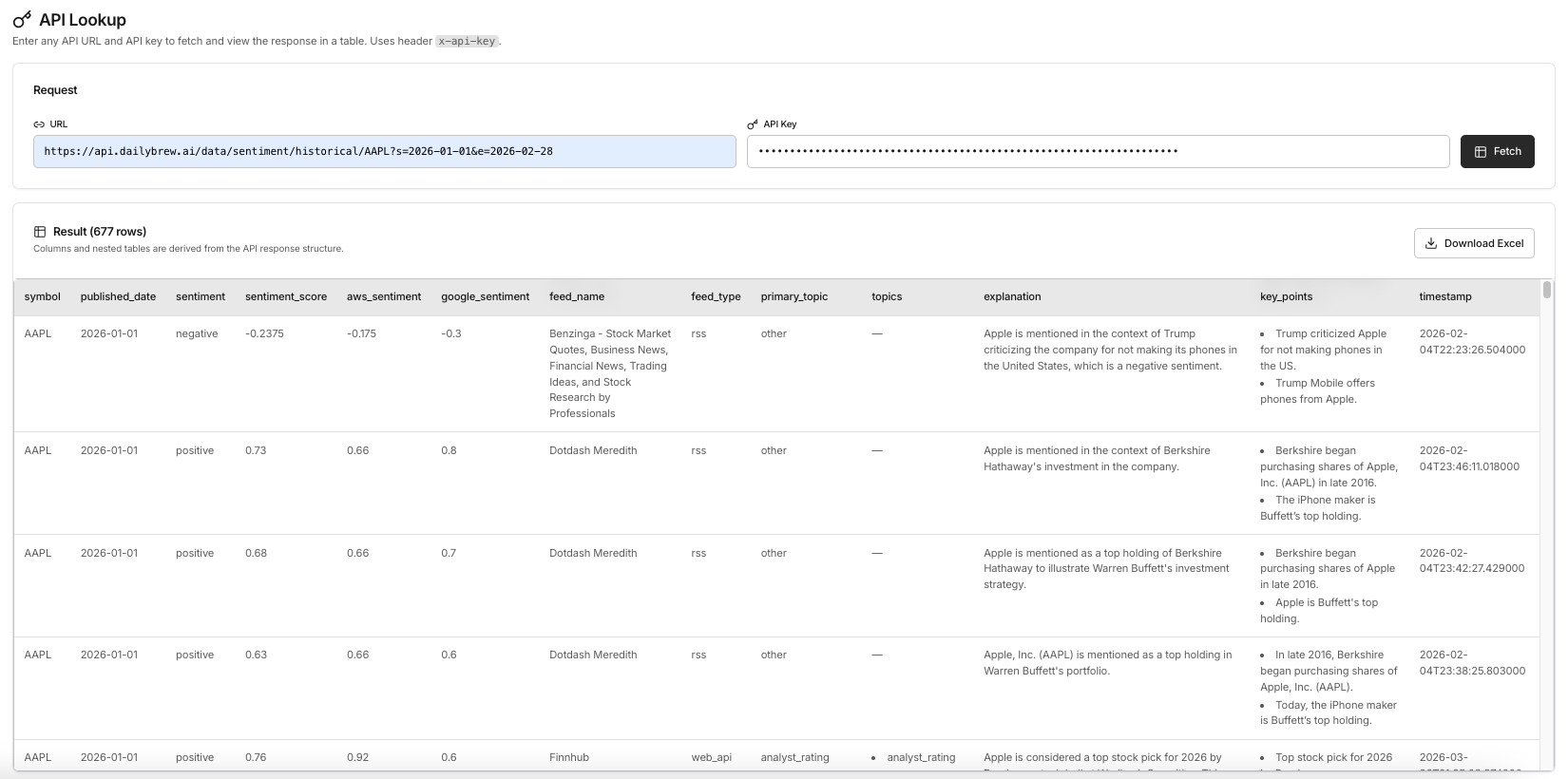
Historical endpoint — same response shape over a date range for trend analysis and warehouse backfills
Integration Patterns
One documented API contract supports four common integration patterns without changes to the response shape. Start with whichever pattern solves the most urgent problem, then expand from there.
Capabilities & Roadmap
The REST API is production-ready. MCP servers and agent tools are in active development — they will expose Daily Brew sentiment as first-class tools that AI agents can call natively, enabling fully agentic research workflows without a human in the loop.
Problem
Copying sentiment data out of a product UI doesn’t scale. It breaks in batch workflows, misses BI integration, can’t power customer-facing features, and creates a manual step that someone has to own. Teams that build on unstructured exports end up with brittle pipelines and stale data.
How Daily Brew helps
Daily Brew serves sentiment as authenticated JSON so your services, jobs, and dashboards consume the same feed-grouped signal the product UI uses. One integration replaces repeated manual exports, and the documented contract gives your team a stable foundation for apps and pipelines at any scale.
Why this use case stands out
An integration-first path for teams that need Daily Brew sentiment running in code, not just in a browser — with an agentic layer coming soon for AI-native research workflows.
How to integrate
Response structure
Each response groups sentiment by source feed — RSS, social, web — with a score, short explanation, and extracted key points per group.
Daily endpoint — example response
// GET /v1/sentiment/daily?symbol=AAPL
{
  "symbol": "AAPL",
  "date": "2025-05-03",
  "feeds": [
    {
      "feed": "rss",
      "score": 0.72,
      "label": "Positive",
      "summary": "Strong earnings guidance...",
      "key_points": ["Beat EPS estimates", ...]
    },
    {
      "feed": "social",
      "score": 0.61,
      "label": "Positive",
      "summary": "Retail sentiment bullish...",
      "key_points": ["iPhone cycle optimism", ...]
    }
  ]
}
Request API access or explore the documentation to start embedding sentiment data in your stack. Sign up for early access to MCP servers and agent tools when they launch.